Guide
How to see how much a brand spends on Meta ads
A competitor’s ad keeps showing up in your feed, or a client asks what a rival is putting behind Meta. The Ad Library shows you the ads, not the budget. Here is the exact way we get a spend estimate, starting from the ad on your phone and ending with a number you can act on.
 SpendPeek team·Updated October 2026·5 min read
The short version
Meta is required by EU law (the Digital Services Act) to publish reach data for every ad that targets people in the European Union. That public data lives in the Meta Ad Library, and it is enough to estimate how much an advertiser is spending. You can do the math yourself, or let a tool read it for you. Below is both.
How we actually do it
Most guides start on a computer. In real life, the ad that makes you curious shows up on your phone. So that is where this starts.
-
Grab the ad's Ad Library link from your phone
When an ad shows up in your Instagram or Facebook feed, you can jump straight to its Ad Library page:
Tap the three dots on the ad → Why you're seeing this ad → Advertiser choices → See ad details in the Meta Ad Library.
That opens (or gives you the link to) that exact ad inside the Meta Ad Library. Copy the link and send it to yourself. Here is the full flow on a real ad:
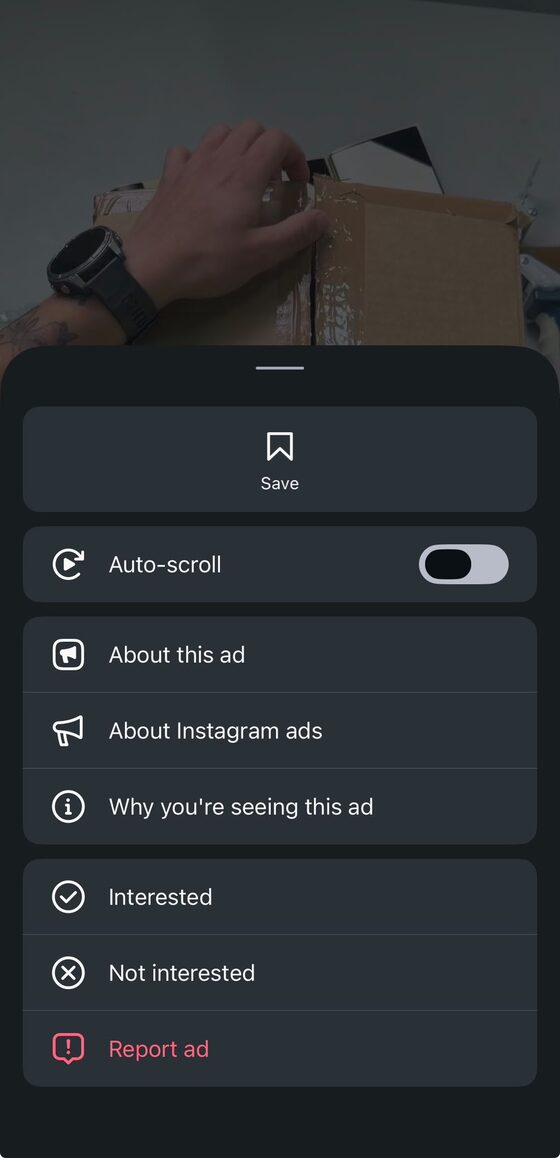
1. Three dots, then Why you're seeing this ad 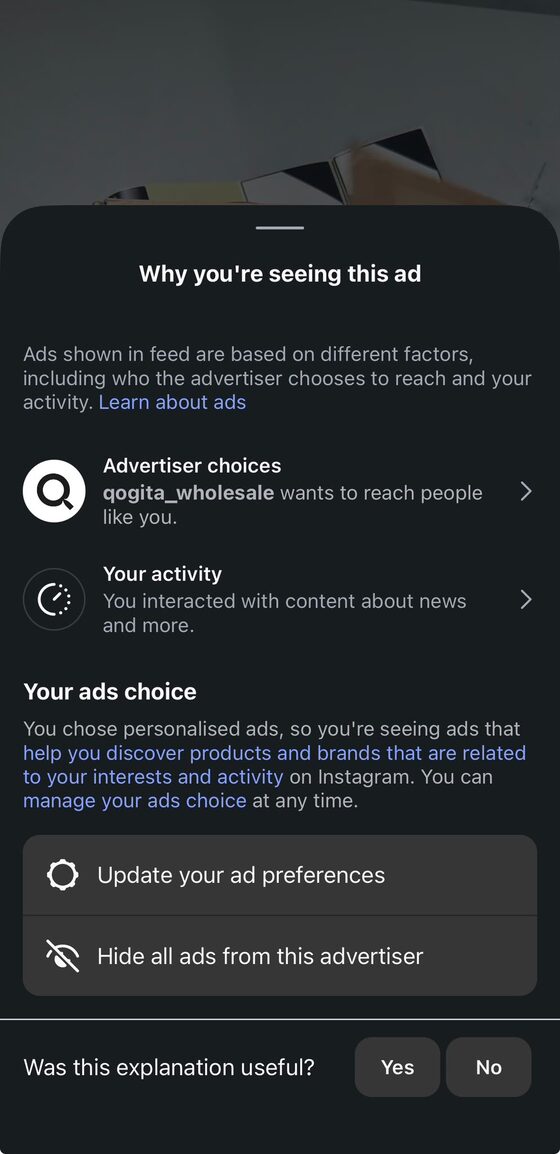
2. Tap Advertiser choices 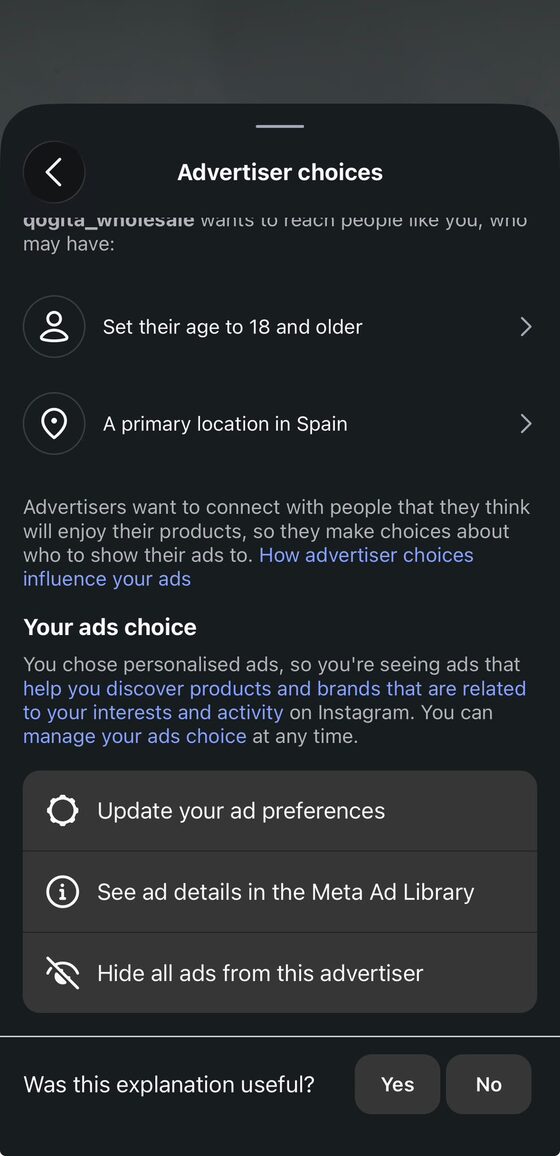
3. Tap See ad details in the Meta Ad Library 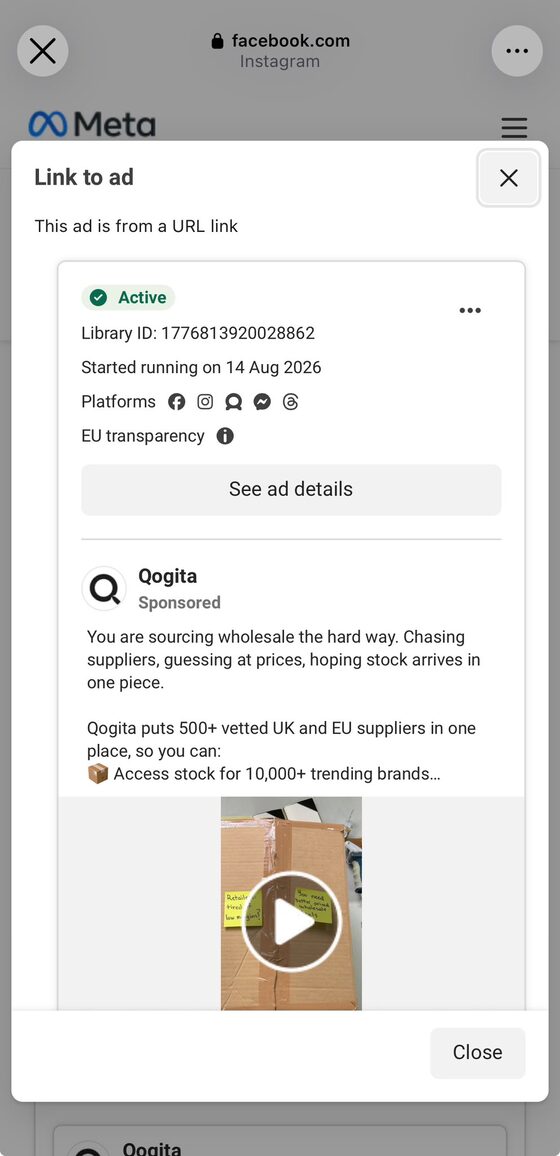
4. The ad opens in the Ad Library -
Open the Ad Library on your computer
Paste that link in a desktop browser. You will land on the advertiser's page in the Meta Ad Library, where you can see every ad they are currently running, not just the one you spotted. For Qogita, that was around 130 active ads.
MetaAd LibraryQogitaQQogita
~130 results · Active adsActive···Library ID: 1031656819753596Aug 14, 2026 · 62 days active3 ads use this creativeSpendPeekReveal spendSpend~€9.9kPer day~€160Reach330kActive···Library ID: 1001865436244814Aug 14, 2026 · 62 days active3 ads use this creativeSpendPeekReveal spendSpend~€9.9kPer day~€160Reach330kActive···Library ID: 825772193956533Aug 14, 2026 · 62 days active2 ads use this creativeSpendPeekReveal spendSpend~€9.9kPer day~€160Reach330kLoad allReveal all spendQogita's Ad Library page: roughly 130 active ads at once. With SpendPeek, every card gets a Reveal spend button, and Reveal all spend (Pro) does the whole brand in one click. -
Reveal the estimated spend
This is the step the Ad Library does not give you on its own. The Ad Library shows reach, but not money. With the SpendPeek Chrome extension installed, an estimated spend appears right on each ad card, next to the reach and EU targeting, so you can see at a glance which creatives have real budget behind them.
Active ···Library ID: 1776813920028862Started running on Aug 14, 2026 · 62 days activeSpendPeek
Winner
Est. spend~€7.4kPer day~€120EU reach247kEU targetingLocations10 EU countries, incl. Germany, France, RomaniaAudienceAge 18–65Top segmentMen 25–34SpendPeek on the same Qogita ad (snapshot from mid-October 2026): about €7,410 estimated spend, around €120 a day, 247,000 EU reach, and the countries and audience behind it.
Why the phone step matters: the extension runs on desktop Chrome, but the ad that sparked your curiosity almost always appears on mobile. Grabbing the link on your phone and finishing on your computer bridges the two.
Prefer to do the math yourself?
You do not need any tool to get a rough number. The Meta Ad Library shows an ad's reach for EU audiences. From there:
Estimated spend ≈ (reach × frequency ÷ 1000) × CPM. The numbers are the Qogita ad from this guide, with SpendPeek’s default assumptions.
Pick a CPM for the advertiser's industry (for many consumer brands something in the €5 to €20 range is a reasonable starting point) and a frequency of how many times, on average, each person saw the ad. It is a back-of-the-envelope estimate, not a billing statement, but it is enough to tell whether a competitor is spending €500 or €50,000. A tool like SpendPeek just does this on every ad for you, and lets you change the CPM and frequency so the assumptions are yours, not a hidden default.
A real example: Qogita
The example above is a real ad we came across. Qogita, a B2B wholesale platform that pitches "500+ vetted UK and EU suppliers in one place", showed up while scrolling Instagram. Following the steps, its Ad Library page confirmed the ad was active (Library ID 1776813920028862), running on Facebook, Instagram, Threads and Messenger, and targeting people 18 and older with a primary location in Spain.
On desktop, with SpendPeek running, the ad we had spotted showed an estimated €7,410 in spend behind about 247,000 reach, aimed at ages 18 to 65 (top segment 25 to 34, male) across ten EU countries including Germany, France and Romania. And that is just one of their ads. With roughly 130 active at once, the real budget is clearly much larger. Live for about two months and still spending around €120 a day, SpendPeek tags it a Winner: Qogita is not testing the waters here. That is exactly the kind of read this takes thirty seconds to get, and it is impossible to guess from the outside without it.
What to do with the number
A spend estimate is only useful if it changes what you do next. This is how media buyers and agencies use it:
Pick which creatives to study
Ads that run for weeks and still get budget are the ones a competitor has proven. Break those down (hook, angle, offer), not the ones still in testing.
Benchmark budgets
Compare a competitor’s spend per ad and per day with yours, so you know whether you are being outspent or out-created.
Answer clients with data
“Around €120 a day behind this ad, live for two months” beats “they seem to be spending a lot”.
What this can and cannot tell you
It is an estimate, not billing data, and it only covers ads shown in the EU, because that is the reach data Meta is required to publish. Think of it as order-of-magnitude competitive intelligence.
Great for
- ✓Spotting which competitors are scaling
- ✓Finding the creatives with real budget behind them
- ✓Order-of-magnitude budget benchmarks
Not for
- ×Exact billing or invoice numbers
- ×Ads shown only outside the EU
- ×Ads too new to have reach data yet
FAQ
Is there a Chrome extension to see competitor Meta ad spend?
Yes. SpendPeek is a Chrome extension that adds an estimated ad spend to every ad in the Meta Ad Library, right on each ad card, alongside reach and EU targeting.
Can I see how much a brand spends without any tool?
Yes, roughly. Use the EU reach shown in the Ad Library and multiply it by a CPM and frequency, as above. A tool just does it automatically on every ad and keeps the assumptions adjustable.
Is SpendPeek legal? Does it scrape Meta?
SpendPeek only reads the public data that the Meta Ad Library already shows you, inside your own browser. It doesn't access private data, your Meta account or your ad accounts.
Is SpendPeek safe for my Meta ad accounts?
Yes. SpendPeek never touches your Meta account or your ad accounts. It works on the public Meta Ad Library, and you don't even need to be logged in to Facebook to use it.
Is SpendPeek free?
Yes, there is a free plan: install the extension and sign in with Google or email to get 3 spend reveals every week, no card needed. Pro (from €4.92/mo billed yearly, or €6.99/mo) adds unlimited reveals and Reveal All.
See competitor spend on every ad
Install SpendPeek for free and the estimate shows up the moment you open the Ad Library. 3 reveals a week, no card.
 Add to Chrome, it’s free